
BitcartCC Version 0.2.0.0 is out!
New paid and confirmed invoice statuses with a transaction speed setting, underpaid invoices, custom logos, dark mode and multiple wallets per currency.

BitcartCC Version 0.2.0.0 released! Payment handling improvements, more customization, better security and UX!
Major update
This update contains numerous changes, some of which are not backwards-compatible
New payment statuses
This update completely changes our status system, by adding new statuses: paid and confirmed.
Pending status was renamed to pending
New store setting, transaction_speed added, which controls when should invoice be marked as complete
New transaction flow:
Invoice created -> pending
Payment received -> paid
Payment has >= 1 confirmation -> confirmed
Payment number of confirmations is >= transaction_speed of the store OR it is a lightning invoice -> complete
Payment expired -> expired
If payment was detected within the invoice time frame, and the payment expired, it won't be set to expired but instead wait for confirmations.
For more details read this: https://docs.bitcart.ai/guides/transaction-speed (opens in new tab)

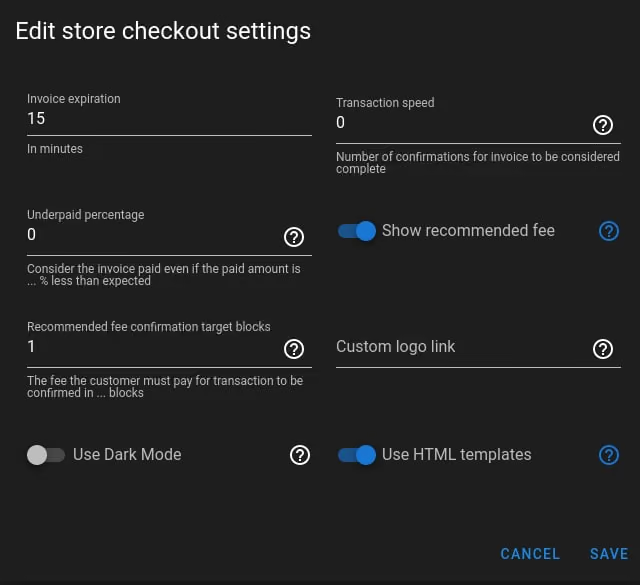
A lot of new store checkout settings
-
Underpaid invoices support. For example, if customer sends from an exchange wallet, it might deduct the fees from amount sent. This way you can accept customer's invoice.
More details here (opens in new tab)
-
Custom logo support. Details (opens in new tab)
-
Dark mode support. Details (opens in new tab)
-
Recommended fee support. Recommended fee will be displayed in all onchain payments methods. Details (opens in new tab)
Multiple wallets of the same currency support
Before, it was disallowed to create an invoice with multiple wallets of the same currency (only one was picked).
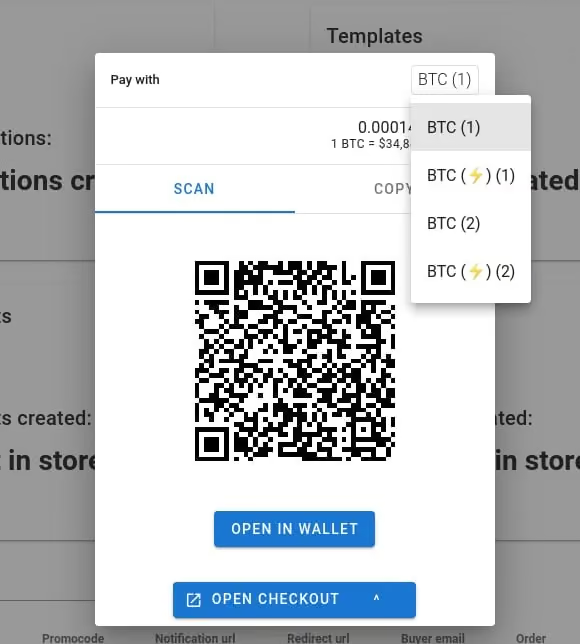
Now it is allowed, and in the checkout, payment methods will be indexed. For example, if you have 2 btc and 2 ltc wallets connected with lightning enabled, here's how it would look:
- BTC (1)
- BTC (⚡) (1)
- BTC (2)
- BTC (⚡) (2)
- LTC (1)
- LTC (⚡) (1)
- LTC (2)
- LTC (⚡) (2)
A new name attribute was added to PaymentMethod's structure, which contains pre-formatted payment method name ready for display
Maintenance
All dependencies of packages has been upgraded, and two maintenance releases were made: of SDK, to make new release with a new license, and of BitCCL, to fix it's use together with SDK 1.0
Quality of life improvements
- By pressing enter in the edit dialog, it will be automatically saved (like in login page, enter to login)
- Added new mark complete batch action, to be able to mark some invoices complete manually. All notifications, emails and scripts will be executed.
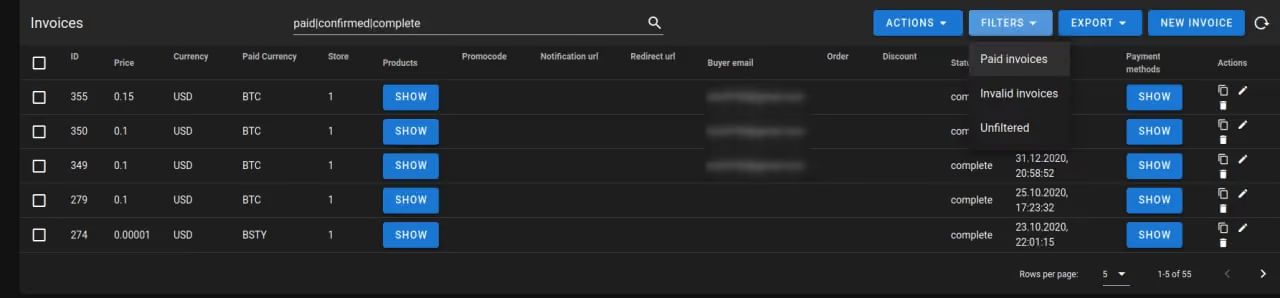
- Added filters to admin panel, it is now possible to easily filter out paid or invalid invoices
Misc changes
- Fixed payment methods order being inconsistent sometimes
- Fixed scrollbars in checkout page being shown on different screen resolutions
- Tor extension logs are now DEBUG level instead of INFO (less log spam)
- Fixed patch/put methods, it is now possible to completely disconnect notifications from store
- Fixed stale expired invoices occuring in rare cases